 Vitals
The vital signs of your PCs and your home network.
Vitals keeps a permanent record of how much internet each of your Windows PCs uses, how healthy they are, what they cost to run, how good your internet connection is, and every device on your home network. It shows your speed by the clock, and a report for one PC, a group or all of them, going back years. Your history stays when you change PC.
Vitals was called Bandwidth Meter until version 1.4.0; it outgrew the name.
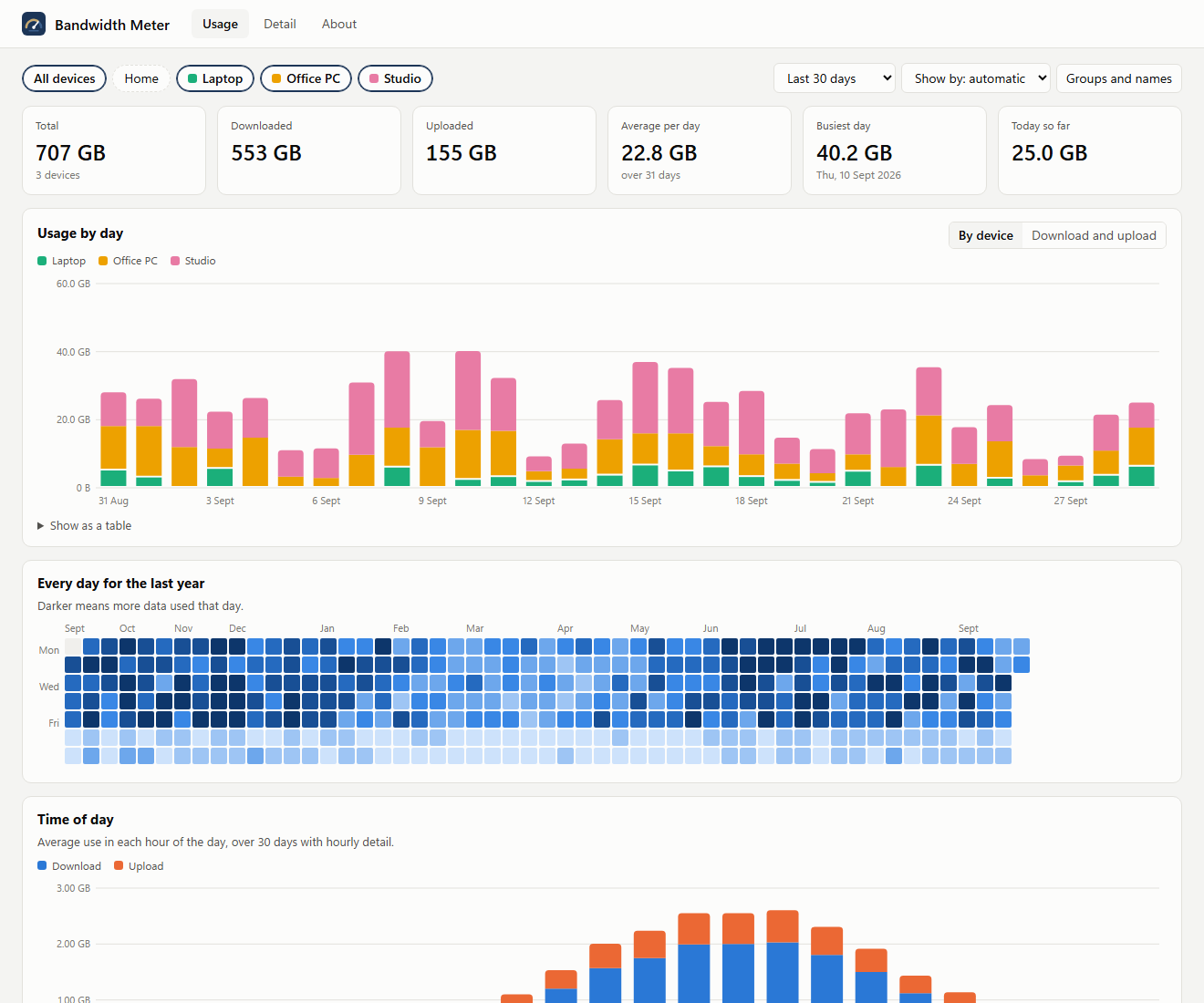
The report, showing three PCs together. The figures shown are invented.
What it does
A meter by the clock
Download and upload speed with megabits per second alongside, today, this week, month, year and all time, processor and memory, CPU and drive temperatures and internet response, in a small table that stays by the clock.
Internet, not the home network
Copies between machines in the house are counted apart, so the totals show what your internet line really carried. The report also shows how much went over the cable, over WiFi and through a VPN.
Live dials
A Live page with dials for download and upload, processor load, memory, temperatures, power and internet response, updated every second while it is open.
Health
How hot the processor runs and how long it spends at its limit, each drive's life left, crashes and Windows updates, and a short speed test every week so you can see if the PC has slowed.
Power and cost
Electricity used by the processor and graphics card, priced at your tariff, day by day, with what the PC draws overnight and what sleeping would save.
Internet quality
Every outage and how long it lasted, how quickly and how steadily the internet answers (what makes video calls choppy), the fastest speed reached against your line, and phone hotspots used.
About this PC
Make and model, processor, memory, graphics, screens, Windows, and every drive by its serial number, including USB drives that come and go, with a dated list of what changed.
Alerts
A Windows notification when the PC runs hot, a program sends far more than usual, another PC stops reporting, or a monthly allowance runs low.
The whole house
With your routers' login, typed once and kept encrypted on one PC, see every byte the house sends to the internet, TVs and phones included, and every device on the WiFi.
How the PC is used
Time at the PC, the programs you used, the busiest programs, when it was on, asleep or off, drive space and battery, for the report only.
One PC, a group or all
The report adds up any choice of PCs. Save groups such as Home or Office, and see which PC uses the most.
History that survives a new PC
Each PC keeps its history in a OneDrive folder. Give a new PC the old one's name and it carries on from where the old one stopped.
Every reading kept
Minute by minute speeds for each connection, processor and memory use, disk activity, and temperatures and other hardware sensors.
Which app used it
Hour by hour, which programs used the data, kept for good instead of Windows' 30 days.
Is the internet up?
A light check every minute records how quickly the internet answers, and every minute it did not. On a laptop, the WiFi signal too.
Brings your BitMeter history
If BitMeter OS is on the PC, setup copies its whole history across, hour by hour, so years of records carry on.
Updates in one click
When a new version is out, the report says so. Click Update and it installs itself, keeping all your history.
The detail behind each day
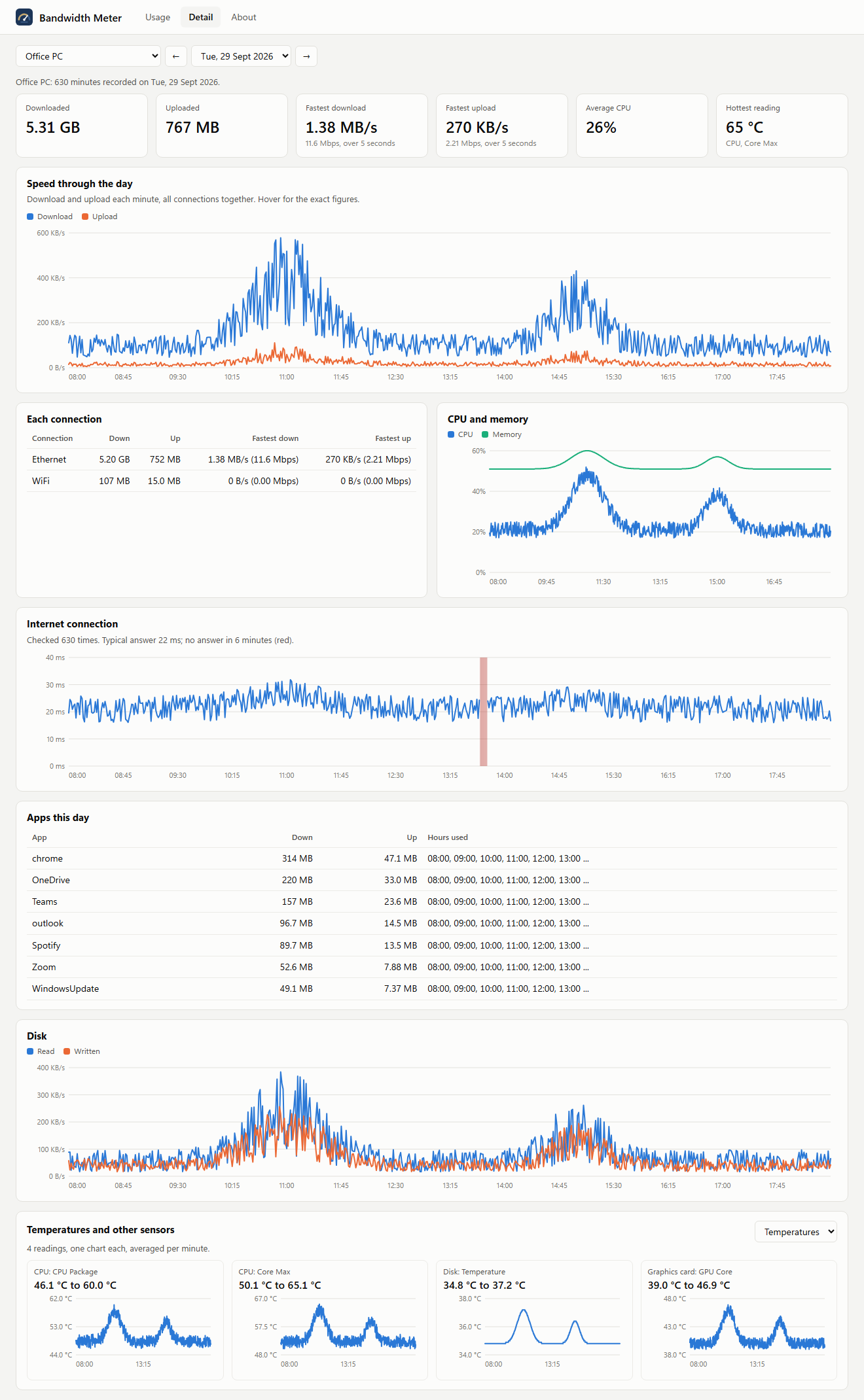
One day on one PC: speed through the day, each connection, processor, memory, disk and temperatures. The figures shown are invented.
Built on TrafficMonitor
The meter by the clock is TrafficMonitor by zhongyang219, included unmodified under its own licence, with an add on of our own that shows everything in a tidy table. Temperatures and other hardware readings come from LibreHardwareMonitor, and processor temperatures through PawnIO, a signed driver installed only if you agree. The recorder, the report and the installer are Vitals's own. Every licence is on the download page and installed with the program.